Subtitles on IPTV: Why Some Content Has None
·4 min read
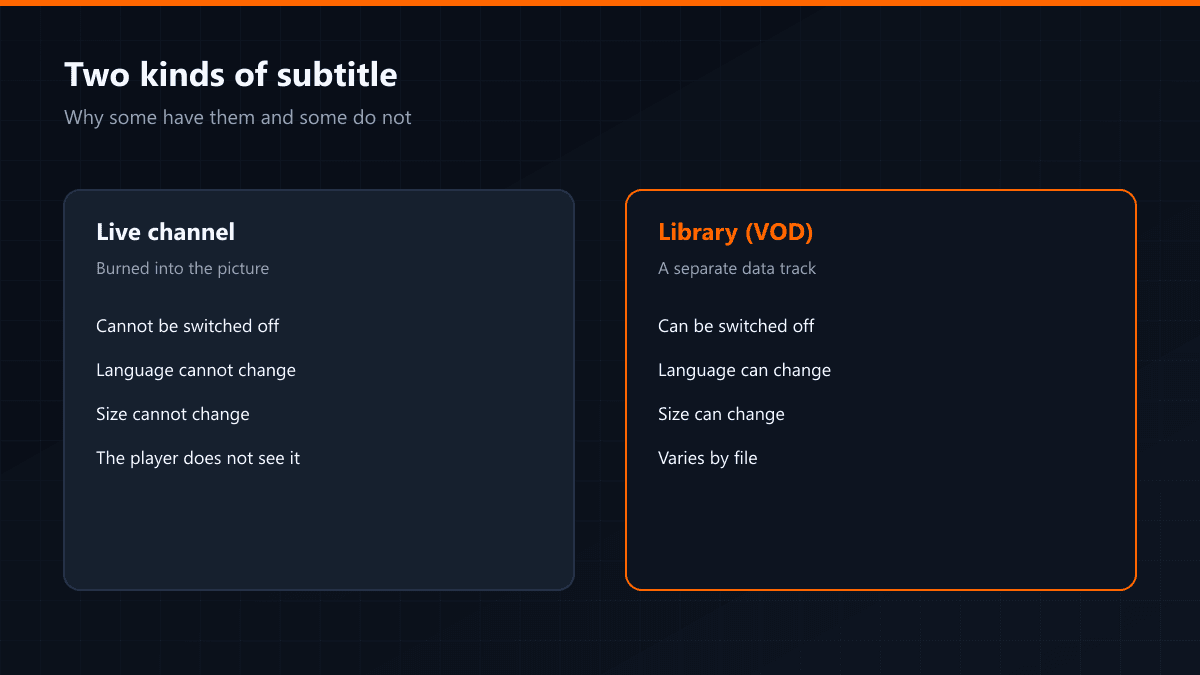
The answer to "why do some things have subtitles and others none" lies in how the subtitle arrives. IPTV carries two different kinds, and they behave nothing alike.
Burned-in subtitles
On live channels the subtitle is usually printed into the picture. It is not data, it is part of the image. It cannot be turned off, the language cannot be changed and the text cannot be enlarged — because as far as the player is concerned there is no subtitle there, only video.
Selectable subtitles
In the film and series library the subtitle arrives as separate data. It opens from the player's subtitle menu, it can be switched off and the language can be changed. Which languages come along varies by file; some titles carry several, some none.
| Live channel | Library (VOD) | |
|---|---|---|
| How it arrives | Burned into the picture | Separate data |
| Can it be switched off | No | Yes |
| Can the language change | No | Depends on the file |
| Can the size change | No | Yes |
Where the subtitle menu is
- TiviMate: menu button while the stream runs > Subtitles
- IPTV Smarters: the subtitle icon on the player bar
- VLC: Subtitle menu > Sub track
If subtitles are on but the characters look broken, the cause is text encoding. Setting the encoding to UTF-8 in the player's subtitle settings fixes accented characters.