IPTV Account Security: Sharing and Passwords
·5 min read
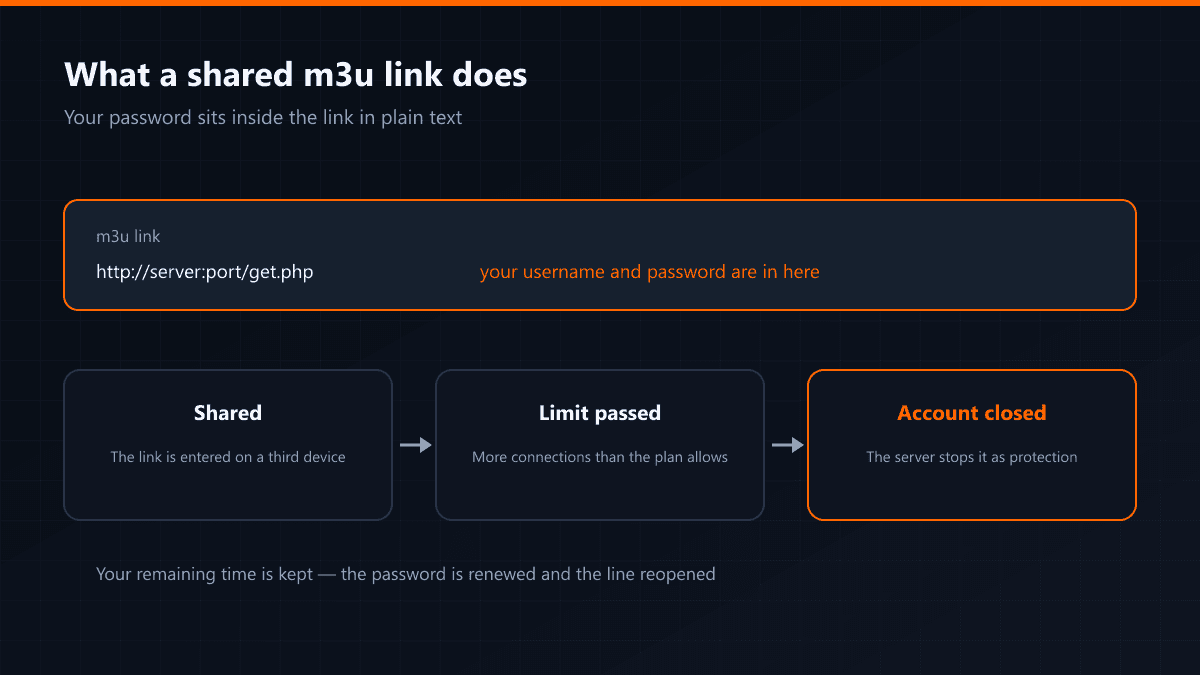
IPTV account security is not a complicated subject, but one detail escapes most users: the m3u link you were given carries your username and password in plain text. Sharing that line is sharing the account.
What happens when it is shared
The server allows as many simultaneous connections as your plan includes. Enter the details on a third device and the limit is passed, at which point the server can close the account to protect it. The symptom is distinctive: the stream drops while you are watching, or a connection-limit warning appears.
A closed account is protection rather than punishment: when dozens of connections open on the same credentials, the server assumes the account has been taken and stops it. Your remaining time is not deleted and the line is reopened.
How to tell somebody else is using it
- The stream drops a few seconds after you start watching.
- The app shows a connection-limit or session warning.
- Favourites or settings look changed although you touched nothing.
- The account closes before the term ends.
What to do
- 01Change the passwordMessage the support line and we will renew it. If you had shared the details, simply do not pass the new password on — the device using the old one drops.
- 02Delete the m3u linkRemove the link from wherever you shared it: messages, a notes app, a screenshot. Because the password is inside it, that line still works.
- 03Upgrade the plan if it is neededIf two screens really do run at home, the problem is the plan rather than sharing. Moving to a two-connection plan removes the limit and the closures stop.
One rule on the app side
Always install the player from an official store or from the app's own site. Modified builds handed around as "premium unlocked" usually carry adware and can send the details you type somewhere else. If the device has slowed down, that is the first place to look.
What we will never ask for
Opening an account needs no ID, address or card details; everything runs over WhatsApp and payment goes by bank transfer. If somebody introduces themselves as your provider and asks for card details or remote access to your device, it is not coming from us.